Similarity Search
Similarity Search is the one route that works audio to audio. Where the rest of CMI searches CORPUS's semantic descriptions, this one compares the sound itself (the acoustic properties of your reference against the catalog) and returns the closest matches.
Reaching it
It is the fourth option CMI offers once it has understood a track: pick "as close as possible" and CMI runs the audio comparison on the reference you gave (a named track's preview, an uploaded file, or a Spotify preview). Uploads are format-agnostic: WAV, AIFF, FLAC, MP3, MP4, AAC, M4A, and most others.
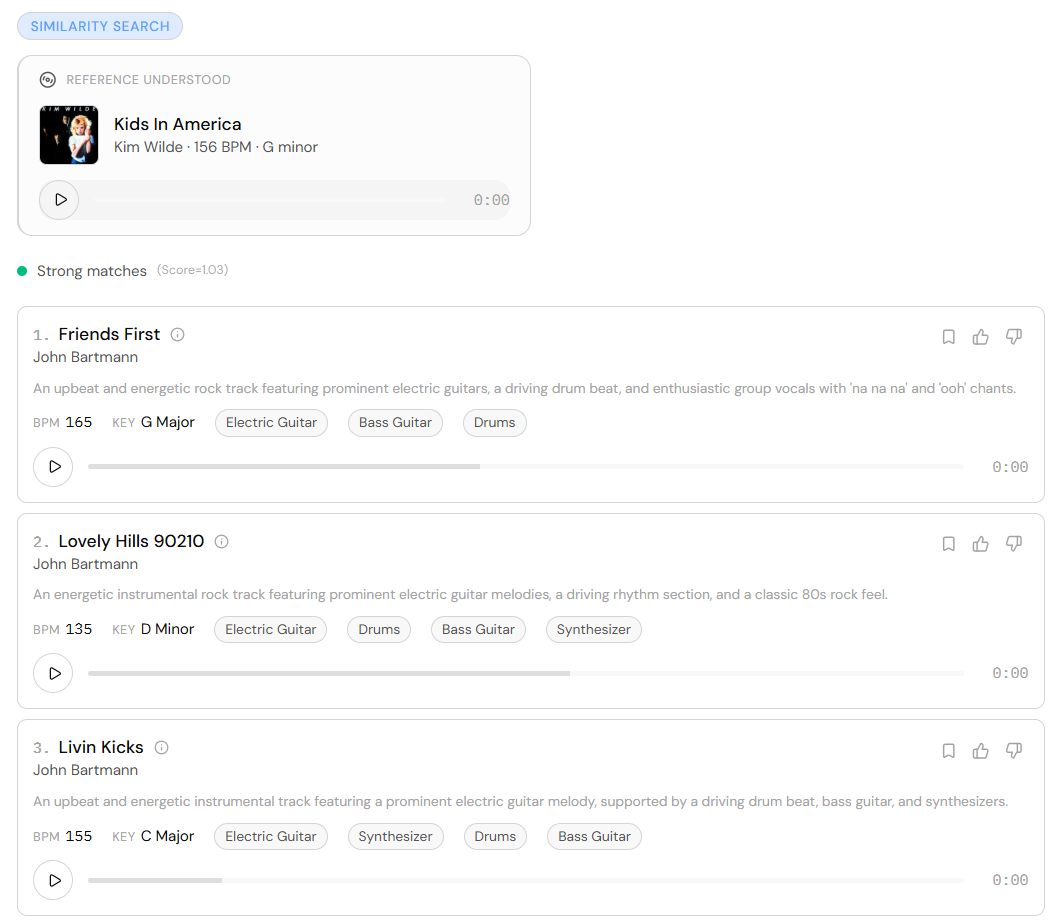
Refine the match
This is the part most similarity tools don't have: once CMI has found close matches, you keep steering by musical attribute without leaving the mode. Filters anchor to the reference, so you describe the difference, not absolute values:
- Tempo: "slower" or "faster" nudges the BPM while holding the character; "same tempo" pins it exactly, for when you have already cut picture to the track.
- Key: "same key" locks the tonality; name another to shift it.
- Instrumentation: "like this, but guitars instead of synths" swaps what's playing.
- Energy and vocals: "more energy", "instrumental", "no vocals".
Anything you don't mention stays as it was in the reference.
How close it landed
Both the audio match and the grounded search that Understand a Track runs carry a traffic light, a quick readout of how close the catalog could actually get: results sitting right on your reference, a decent fit, or a weak one. It tells you whether to trust the top of the list or push the search further.
What the corpus matches on is in What CORPUS Knows About Each Track.